Best cheap cell phones for seniors under $100
A hundred dollars buys a better phone for an older hand than a thousand does. What it does not buy is a plan, and that is where the real money goes.
By Selena H. · Last checked November 19, 2026 · How we keep pages current
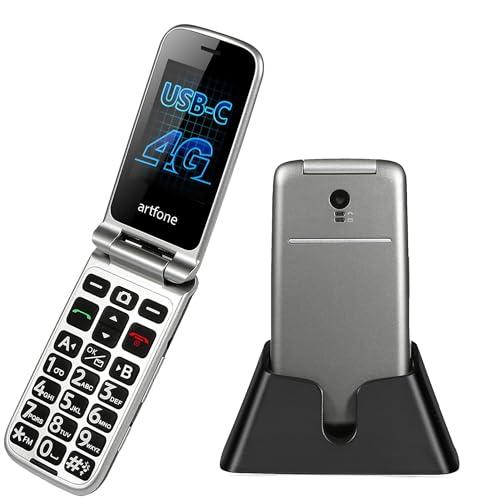
Under a hundred dollars is not the compromise end of this market, it is the sensible end. The artfone G3 is the one to buy if the budget is tight and the problem is dialing: it is the cheapest phone here, it speaks each number aloud as it is pressed, and it charges in a cradle rather than off a cable. If the person wants the simplest possible menu and the help line that goes with it, the Lively Jitterbug Flip3 sits at the top of this price band - with the significant catch that it only works on Lively's own service.
Spending more rarely helps here. The features that make a phone usable at eighty - keys that click, an earpiece loud enough to hear over a kettle, a menu that does not move when nobody is looking - are cheap to build and are mostly found at the bottom of the price list. The things that cost money are a better camera, a faster processor and a bigger screen, and none of those is the thing that is going wrong.
What a low price does cost you is support life and polish. A sixty-dollar phone from a small brand is unlikely to get software updates for five years, spare parts are not a thing, and the manuals read like they were translated in a hurry. For a phone used for calls and texts, that matters far less than it would on a smartphone - but it is the honest trade and it is worth knowing before buying.
Five phones are below, ranked for what they do for an older hand rather than for the spec sheet. Every one was confirmed on sale at the time of writing, and all five sit under a hundred dollars - prices move, so the button on each pick shows today's. We have not used any of them; the descriptions come from the manufacturers' own listings and what owners report.
Some links on this page go to Amazon. If you buy something, we may earn a small commission at no extra cost to you — it never changes which products we pick or the order they appear in. Full disclosure.
What to check before buying a cheap phone
- Unlocked or carrier-locked - an unlocked phone takes a SIM from any compatible carrier, a locked one does not
- Hearing-aid compatibility, rated M4/T4 at best, if hearing aids are worn
- A charging dock rather than a cable, if arthritis makes aiming a small plug difficult
- An SOS or emergency key, and who it actually calls - most of them dial a list you program, not 911 dispatch
- Whether the plan is included. A phone that needs the maker's own service costs far more over two years than the sticker suggests
The phone is the small number. Our guide to no-contract senior cell phone plans covers the one that repeats every month.
Quick picks
Ranked for how little strength, eyesight or patience they need — not for how much they cost.
| # | Product | Best for | Score | Price |
|---|---|---|---|---|
| 1 | artfone G3 Flip PhoneThe budget pick: a 4G flip with backlit keys that speaks each number as it is pressed, and a charging cradle instead of a cable. | The lowest price that still does the job | 8.8 | $34.99 · View on Amazon #ad Price as of November 28, 2026. How we earn |
| 2 | 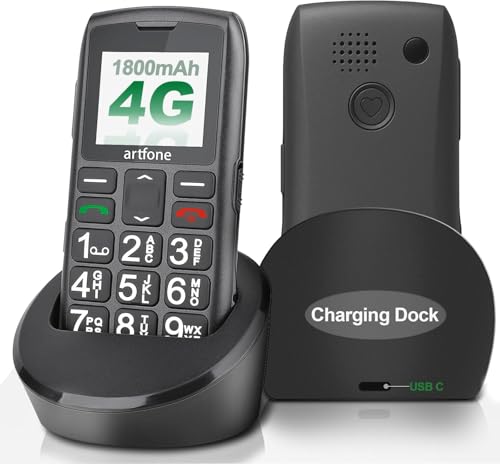 artfone C1+ Big Button PhoneA one-piece big-button phone with an SOS key, a charging dock and a loud speaker - the bar-phone answer at this price. | Big keys without a lid to open | 8.6 | $49.99 · View on Amazon$54.99(9% off) #ad Price as of November 28, 2026. How we earn |
| 3 | 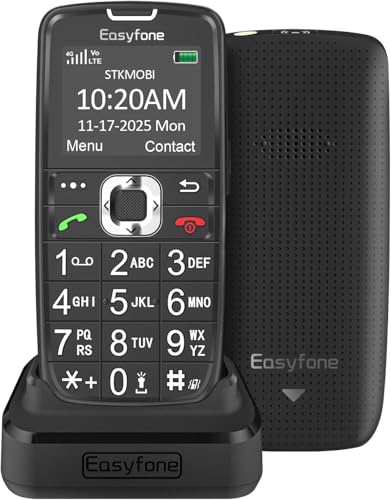 Easyfone Prime-A6 Big Button PhoneSold with no internet connection and no camera at all, which is the point rather than a limitation. | A phone with nothing in it to get lost in | 8.5 | $59.99 · View on Amazon #ad Price as of November 28, 2026. How we earn |
| 4 | 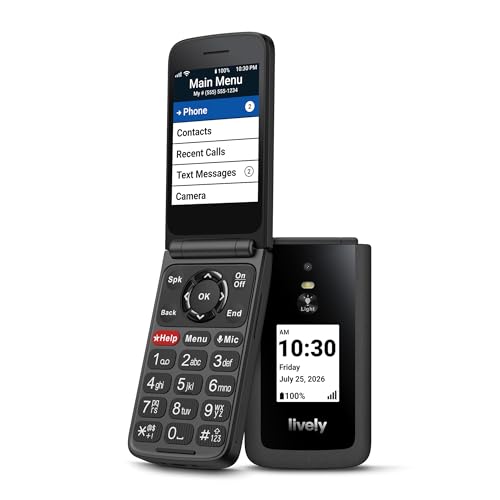 Lively Jitterbug Flip3The best-known senior phone in the United States, now sold on Amazon - but it only works on Lively's own service. | The simplest menu, and a help line behind it | 8.4 | $59.99 · View on Amazon$79.99(25% off) #ad Price as of November 28, 2026. How we earn |
| 5 | 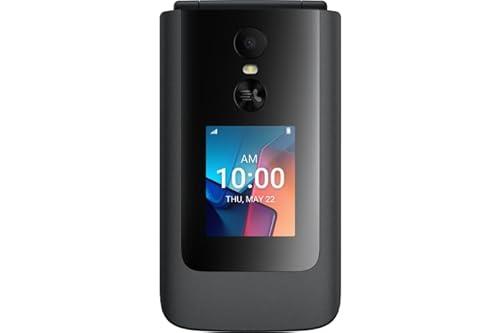 TCL FLIP 4 5GThe one built by a major manufacturer: 5G, KaiOS, large buttons and HD Voice, at the top of this price band. | A current network, not a cheap chipset | 8.4 | $79.95 · View on Amazon #ad Price as of November 28, 2026. How we earn |
Tap any row to jump to the full write-up. The price button goes to Amazon.
Pick by what’s hard
Most lists sort by price. That is not how this decision actually gets made, so here it is sorted by the thing that is getting in the way.
- Dials the wrong number and does not notice
- artfone G3 Flip Phone — a phone that speaks each digit aloud catches the error while it is still a key press rather than after a stranger answers. It costs nothing extra at this price.
- Cannot aim a charging cable
- artfone C1+ Big Button Phone — buy a phone with a drop-in dock. A phone that is hard to charge is a phone that is flat when it matters, and this is the single most common reason a cheap handset gets abandoned.
- Keeps pressing something and breaking it
- Easyfone Prime-A6 Big Button Phone — buy a handset with no browser and no app store on it at all. Settings can be changed back; a phone with nothing to change cannot get into that state.
- Nobody nearby to set it up or answer questions
- Lively Jitterbug Flip3 — pay for the service rather than the hardware. The help line behind the Jitterbug is what you are buying, and it is worth more than the handset is.
- Worried it will be obsolete in two years
- TCL FLIP 4 5G — buy from a manufacturer large enough to still exist, and buy the current network generation. That is the whole argument for spending the top of this budget rather than the bottom.
How we picked
We don’t run a product lab. Every pick here is chosen by reading the things that actually tell you whether something works for weak hands, poor eyesight or shaky fingers: the manufacturer’s own specifications, the retailer listing, the measurements and weights, and what owners report in their reviews — especially the one-star ones. We read the complaints before the praise.
Prices change constantly, so we send you to Amazon to see today’s price rather than printing a number that goes stale. More about how we choose.
The picks in full
1. Best for the lowest price that still does the job
artfone G3 Flip Phone
artfone · 8.8/10 on our rubric
#ad Price as of November 28, 2026. How we earn
The budget pick: a 4G flip with backlit keys that speaks each number as it is pressed, and a charging cradle instead of a cable.
This is the cheapest phone on the page and it is not the worst one, which is unusual in any category. The feature that earns it the top slot for the money is the talking keypad - artfone calls it talking numbers, and it means a wrong digit is heard as it is pressed rather than discovered when a stranger answers.
The rest is sensibly chosen for the audience. Big backlit keys that can be found in a dim hallway, a clamshell body that ends a call by being shut, an SOS key on the back, speed dial for the regulars, and a cradle you drop the phone into instead of a cable you have to aim at a small outlet. It is unlocked, so the SIM and the plan are a separate decision.
The honest reservation is longevity. artfone is a small brand, and a phone at this price is not something to expect five years of software support from. At this price, buying a second one in three years is still cheaper than most alternatives.
Good
- Speaks each number as it is pressed, which catches mis-dials early
- Big backlit keys and an SOS key on the back
- Charging cradle rather than a cable to aim
- Unlocked, so the plan can be shopped separately
Watch out for
- Small brand - do not expect years of software support
- No photo dialing, so the contacts still have to be read
| Type | 4G flip phone, unlocked |
|---|---|
| Dialing help | Speed dial, spoken numbers |
| Display | 2.4-inch color screen, backlit keypad |
| Charging | Cradle |
How it scores
- Ease of dialing8.8
- Hands and grip8.6
- Hearing7.8
- Value9.6
2. Best for big keys without a lid to open
artfone C1+ Big Button Phone
artfone · 8.6/10 on our rubric
#ad Price as of November 28, 2026. How we earn
A one-piece big-button phone with an SOS key, a charging dock and a loud speaker - the bar-phone answer at this price.
Some hands cannot open a clamshell reliably and some people find a two-part phone confusing rather than simple. The C1+ is the alternative shape: one piece, a full keypad of large keys, and nothing that has to be unfolded before a call can be answered.
artfone lists it with a loud speaker, hands-free calling, a large font, FM radio, an SOS button and an 1800 mAh battery, which is a usefully large cell for a phone with nothing power-hungry in it - this is a handset that goes several days between charges rather than needing one nightly. It also charges in a dock.
It is a phone for calls and texts and very little else, and the keypad texting is as slow as it sounds. That is a feature for the right buyer and a dealbreaker for anyone who still wants to send a photo.
Good
- One-piece body with large keys - no lid to open
- Loud speaker and hands-free calling (manufacturer listing)
- 1800 mAh battery and a charging dock
- SOS button and large on-screen font
Watch out for
- Texting on a numeric keypad is slow going
- Small brand with limited long-term support
| Type | 4G big-button bar phone |
|---|---|
| Battery | 1800 mAh (manufacturer listing) |
| Emergency | SOS button |
| Charging | Dock |
How it scores
- Ease of dialing8.4
- Hands and grip8.8
- Hearing8.2
- Value9.0
3. Best for a phone with nothing in it to get lost in
Easyfone Prime-A6 Big Button Phone
Easyfone · 8.5/10 on our rubric
#ad Price as of November 28, 2026. How we earn
Sold with no internet connection and no camera at all, which is the point rather than a limitation.
Easyfone builds this one by subtraction. There is no internet and no camera on it, which removes at a stroke the three things that cause the most trouble on a simplified smartphone: a browser to get lost in, a camera that fills the storage, and an app store that asks for a password nobody remembers.
What is left is a big-button 4G handset with clear call audio, an SOS button, FM radio and a drop-in charging dock. For a household where the complaint is that the phone keeps changing or that somebody has pressed something and now it will not work, this is the shape of the answer.
It is also the phone to think twice about if the person still wants to take a photograph of a grandchild. There is no camera, and no amount of wanting one later will add it.
Good
- No internet and no camera, so there is nothing to wander into
- Big, widely separated keys and clear call audio
- SOS button and a drop-in charging dock
- Unlocked - any compatible prepaid SIM works
Watch out for
- No camera at all, which some people miss immediately
- Speed-dial numbers have to be programmed by somebody else first
| Type | 4G big-button bar phone, unlocked |
|---|---|
| Internet | None (manufacturer listing) |
| Camera | None |
| Charging | Drop-in dock |
How it scores
- Ease of dialing8.6
- Hands and grip8.6
- Hearing8.0
- Value8.6
4. Best for the simplest menu, and a help line behind it
Lively Jitterbug Flip3
Lively · 8.4/10 on our rubric
#ad Price as of November 28, 2026. How we earn
The best-known senior phone in the United States, now sold on Amazon - but it only works on Lively's own service.
The Jitterbug is the phone most families have heard of, and the reason is the software rather than the hardware. The menu is a short list of plain words with no icons and no swiping, the volume goes genuinely loud, and there is an urgent response service and a help line behind it that other phones at this price do not have.
The catch is the one to read twice. Lively's own listing states that it requires an activated Lively phone plan and is not compatible with other carriers. The handset price on this page is therefore the start of the cost, not the whole of it, and a household already paying for a phone line will be paying for a second one.
Taken as a package rather than as a handset, it is still the right answer for a lot of families - particularly where nobody local can set a phone up or answer questions about it. Judged purely as hardware for the money, the unlocked phones above do more for less.
Good
- The simplest menu of any phone here - a list of words, no icons
- Loud earpiece and speaker
- Urgent response and a help line behind the handset
Watch out for
- Requires an activated Lively plan and does not work on other carriers (manufacturer listing)
- The monthly service is the real cost - compare it before buying the handset
| Type | Flip phone |
|---|---|
| Network | Lively service only (manufacturer listing) |
| Menu | Plain-word list, no icons |
| Support | Lively help line and urgent response |
How it scores
- Ease of dialing9.0
- Hands and grip8.6
- Hearing8.8
- Value7.0
5. Best for a current network, not a cheap chipset
TCL FLIP 4 5G
TCL · 8.4/10 on our rubric
#ad Price as of November 28, 2026. How we earn
The one built by a major manufacturer: 5G, KaiOS, large buttons and HD Voice, at the top of this price band.
This is the phone to buy if the worry is that a cheap handset will be obsolete in two years. TCL is a large manufacturer rather than a marketplace brand, the FLIP 4 runs 5G rather than 4G, and TCL lists it with large buttons and HD Voice - the clearer call audio standard that most of the budget handsets here do not mention.
KaiOS is a middle ground between a dumb phone and a smartphone: a simple list-based interface that still allows a handful of apps and a data connection. For somebody who wants a simple phone but occasionally needs maps or a weather app, that is a genuinely useful halfway house.
The listing is a T-Mobile version, so check the network before buying - this is not an unlocked handset that takes any SIM. That is the trade for the lower price on a current-generation phone from a major brand.
Good
- 5G and a major manufacturer behind it, so it will stay usable longer
- Large buttons and HD Voice (manufacturer listing)
- KaiOS allows a few apps without becoming a smartphone
Watch out for
- This listing is a T-Mobile version, not unlocked
- A little more menu than the plainest phones here
| Type | 5G flip phone |
|---|---|
| Carrier | T-Mobile version (retail listing) |
| Software | KaiOS |
| Storage | 2 GB RAM / 32 GB (manufacturer listing) |
How it scores
- Ease of dialing8.2
- Hands and grip8.6
- Hearing8.4
- Value8.2
What you give up under $100 - and what you do not
The list of things you lose at this price is shorter than people expect. You lose camera quality, screen quality and processing speed, none of which decides whether a phone is usable by somebody with arthritic hands or failing eyesight. You lose long software support, which matters on a smartphone holding a bank app and matters much less on a handset used for calls.
What you keep is almost everything that counts here: physical keys with a real click, a loud earpiece, a dedicated emergency key, a charging dock, and a menu short enough to learn. Those are cheap to manufacture, which is why the budget end of this market serves older buyers better than the premium end does.
The one thing genuinely worth paying up for is hearing-aid compatibility, and it is the specification most likely to be missing from a budget listing. If hearing aids are worn, look for an M4/T4 rating stated explicitly and treat its absence as a no.
The plan costs more than the phone
A sixty-dollar handset on a thirty-dollar-a-month plan costs seven hundred and eighty dollars over two years, and the handset is eight percent of that. This is the part of the decision that most buying advice skips, and it is where the money actually is.
Two routes keep it down. An unlocked phone - three of the five picks here are unlocked - lets you take a cheap prepaid SIM from any compatible carrier and change it whenever the price goes up, without changing the phone. A carrier-locked or service-locked phone ties you to one provider's pricing for as long as you keep the handset.
Our guide to no-contract senior cell phone plans goes through the options properly, including the low-minute plans that suit somebody who makes four calls a week and is paying for unlimited everything.
Before choosing a carrier, check coverage at the specific address rather than in the city. The cheapest plan is no use on a network with one bar in the kitchen.
SOS keys: what they actually do
Almost every phone in this price band advertises an SOS or emergency key, and almost none of them does what families assume. On most of these handsets the key dials a list of numbers you program in sequence, sometimes sending a text as well. It does not connect to a monitoring center and it does not summon an ambulance on its own.
That is still useful - one key that calls a daughter and then a neighbor is better than hunting through contacts - but it is not a medical alert. If the need is a fall at home with nobody to call, a device built for that job is the right purchase, and our medical alert roundup covers the ones without a monthly fee as well as the monitored ones.
If the phone is the emergency plan, program the key the day it arrives rather than leaving it for later, and test it once with the people on the list so nobody is startled.
Flip or bar at this price?
A flip phone ends a call by being closed, which is the most reliable gesture on any phone - no key to find and no screen to tap. It also protects the keypad in a pocket and is harder to dial by accident. The cost is that it has to be opened, which takes a pinch and a small amount of force that not every hand has.
A one-piece bar phone asks nothing of the hands to open, has its keys ready at all times, and is easier to answer quickly. The trade is that calls end with a key press, and that a phone with an exposed keypad in a pocket occasionally calls somebody by itself.
Neither is better. If opening a clamshell is a struggle, buy the bar phone; if ending calls reliably is the problem, buy the flip. Our flip phone roundup and our large-button phone roundup go further into each shape.
Questions people ask
▸What is the best cheap cell phone for an elderly person?
For most people on a tight budget, an unlocked 4G flip or big-button handset with an SOS key and a charging dock. The artfone G3 is the cheapest here that still speaks each number as it is pressed; the Easyfone Prime-A6 is the one with no internet or camera on it at all. Both cost well under a hundred dollars and both take a prepaid SIM from any compatible carrier.
▸Are cheap phones for seniors any good?
At this end of the market, yes - because the features that make a phone usable with arthritis or poor eyesight are inexpensive to build. Physical keys, a loud earpiece, a short menu and a charging dock are all found under a hundred dollars. What a low price costs you is software support and build polish, not usability.
▸Does a cheap senior phone come with a plan?
Usually not, and the plan is the bigger cost. An unlocked handset takes a prepaid SIM from any compatible carrier, which is the cheapest route. The Lively Jitterbug Flip3 is the exception on this page: it requires Lively's own service and will not work on another carrier, so the monthly cost has to be counted before comparing it with the others.
▸Do the SOS buttons on cheap phones call 911?
Usually not directly. On most handsets in this price range, the key dials a list of numbers you program, one after another, and may send a text as well. It is not a monitored medical alert, and if a fall at home with nobody nearby is the real worry, a dedicated medical alert device is the right purchase instead.
▸Should I buy a flip phone or a big-button bar phone?
Buy the flip if ending calls reliably is the problem, because closing the lid always works. Buy the bar phone if opening a clamshell is a struggle, because there is nothing to unfold and the keys are always ready. Both shapes are available under a hundred dollars, so this is a question about the hands rather than about the budget.
Sources
Read next
Best overall phone
Best phones for seniors that are genuinely easy to use
Our main phone roundup: flip phones, big-button handsets and the amplified home phone with photo keys, sorted by constraint.
Read the guide →
Best flip phone
Best flip phones for seniors
Current 4G flip phones worth buying, ranked for one-handed use, key feel and call volume.
Read the guide →
Best big-button keys
Best large button cell phones for seniors
Phones with physical keys big enough to find without looking, including two with spoken digits.
Read the guide →
Guide
No-contract cell phone plans for seniors
How no-contract senior plans really work, the costs that are not in the headline, and which route fits.
Read the guide →
Best with no monthly fee
Best medical alerts with no monthly fee
Subscription-free alerts, with the honest trade-off column nobody else prints.
Read the guide →