Easiest TV remotes for seniors
The problem is never that the buttons are small. It is that there are forty of them and only six get used.
By Selena H. · Last checked October 13, 2026 · How we keep pages current
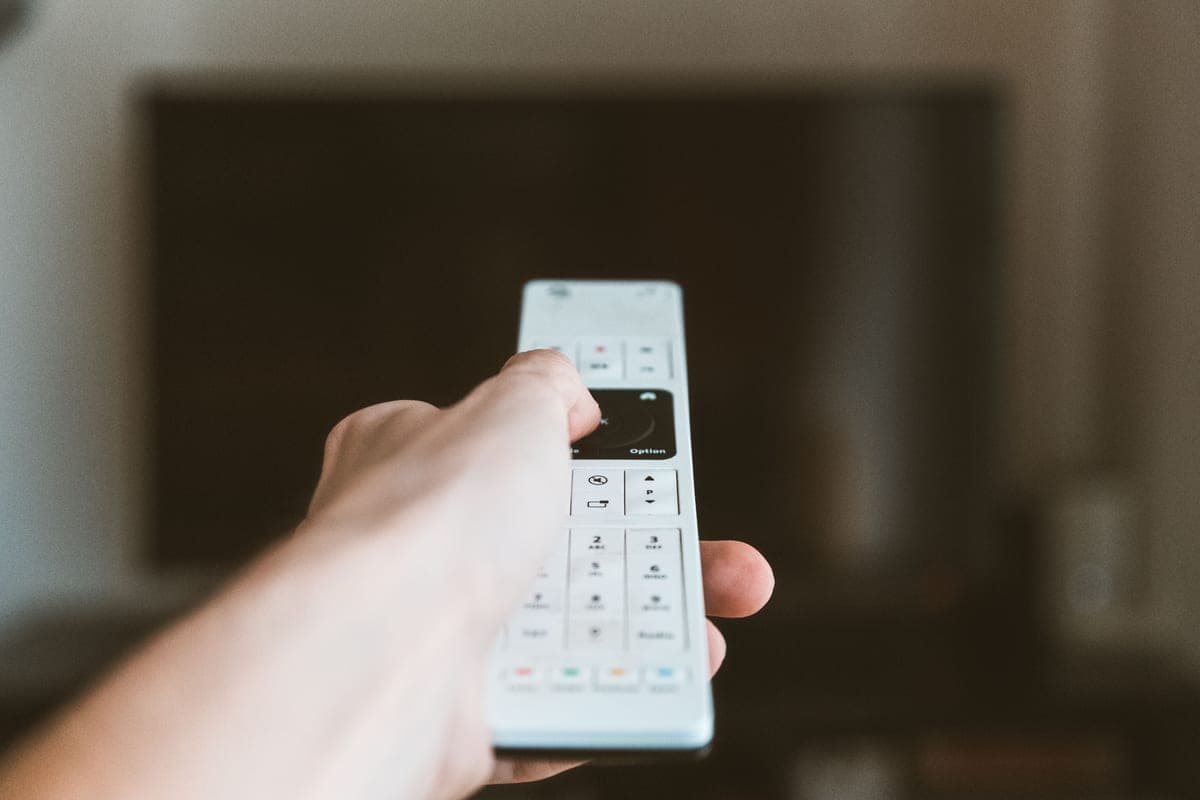
Count the buttons on a modern television remote. Then count how many a person over eighty actually uses: power, volume, channel, mute. Everything else is a chance to end up on an input screen with no idea how to get back, which is how a working television becomes "the TV's broken" twice a week.
So the right remote is not the one with the largest print. It is the one with the fewest keys, ideally with the setup locked so nothing can be reprogrammed by accident.
Before you buy anything, try the free fix: most streaming boxes and smart TVs have a simplified remote mode or a lock in their accessibility settings, and some have a phone app that can act as a backup remote for a family member sorting things out over the phone.
Some links on this page go to Amazon. If you buy something, we may earn a small commission at no extra cost to you — it never changes which products we pick or the order they appear in. Full disclosure.
Quick picks
Ranked for how little strength, eyesight or patience they need — not for how much they cost.
| # | Product | Best for | Score | Price |
|---|---|---|---|---|
| 1 | Flipper Big Button Universal RemotePower, volume, channel and mute. The setup slides under a cover so it cannot be changed by accident. | Six buttons and nothing else | 9.2 | Check price on Amazon #ad Prices change daily, so we send you to check today's. How we earn |
| 2 | GE Backlit Universal RemoteA conventional universal remote with a backlight, for when the room is dim rather than the user confused. | A dark room | 7.2 | Check price on Amazon #ad Prices change daily, so we send you to check today's. How we earn |
| 3 | Roku Express 4K+The simplest remote in television comes free with the cheapest streaming box. | Replacing the whole problem | 8.5 | Check price on Amazon #ad Prices change daily, so we send you to check today's. How we earn |
Tap any row to jump to the full write-up. The price button goes to Amazon.
Pick by what’s hard
Most lists sort by price. That is not how this decision actually gets made, so here it is sorted by the thing that is getting in the way.
- Keeps ending up on the wrong input
- Flipper Big Button Universal Remote — a remote with no input or menu keys cannot do it. Keep the original remote hidden for when you need it.
- Cannot see the buttons in the evening
- GE Backlit Universal Remote — a backlight fixes exactly this, and nothing else.
- Several remotes on the arm of the chair
- Roku Express 4K+ — consolidate. One streaming box with a simple remote replaces the cable box remote and most of the TV's.
- Shaky hands drop the remote
- look for a chunky remote with a rubberized back, and keep a second one charged. A dropped remote that still works is a non-event.
How we picked
We don’t run a product lab. Every pick here is chosen by reading the things that actually tell you whether something works for weak hands, poor eyesight or shaky fingers: the manufacturer’s own specifications, the retailer listing, the measurements and weights, and what owners report in their reviews — especially the one-star ones. We read the complaints before the praise.
Prices change constantly, so we send you to Amazon to see today’s price rather than printing a number that goes stale. More about how we choose.
The picks in full
1. Best for six buttons and nothing else
Flipper Big Button Universal Remote
Flipper · 9.2/10 on our rubric
#ad Prices change daily, so we send you to check today's. How we earn
Power, volume, channel and mute. The setup slides under a cover so it cannot be changed by accident.
The Flipper is the clearest answer to this problem on the market. The face carries only the keys that get used, each large, raised and color-coded, and the programming controls hide behind a sliding cover so a stray press cannot reconfigure anything.
It also stores a short list of favorite channels, which is the feature that most helps someone who watches four stations and finds the numbers hard to remember.
It controls a small number of devices, which is the point rather than a shortcoming. If the television needs a box and a soundbar juggled too, program the essentials and leave the rest to a second remote kept in a drawer.
Good
- Only the keys that get used, large and color-coded
- Setup hidden behind a cover so it cannot be changed by accident
- Stores a short favorites list
Watch out for
- Controls a limited number of devices
- No menu or input keys at all — deliberate, but keep the original remote for setup
| Buttons | Power, volume, channel, mute, favorites |
|---|---|
| Lock | Programming hidden under a cover |
| Devices | TV plus one set-top box |
| Best for | Anyone who gets lost in menus |
How it scores
- Few enough buttons9.8
- Button size and feel9.2
- Hard to break9.4
- Setup burden7.6
2. Best for a dark room
GE Backlit Universal Remote
GE · 7.2/10 on our rubric
#ad Prices change daily, so we send you to check today's. How we earn
A conventional universal remote with a backlight, for when the room is dim rather than the user confused.
Not everyone needs the buttons removed — some people simply cannot see them after dark. A backlit universal remote solves that specific problem and keeps the full function set for someone who still uses it.
It is a conventional remote, so the usual caution applies: it can be reprogrammed by a long press, and it will occasionally be. Write the device codes on a label stuck to the back.
Good
- Backlit keys for a dark room
- Controls several devices
- Inexpensive
Watch out for
- Full button count — no simplification
- Can be reprogrammed accidentally
| Buttons | Full set, backlit |
|---|---|
| Devices | Several |
| Power | Batteries |
| Best for | Low light rather than low confidence |
How it scores
- Few enough buttons5.8
- Button size and feel8.0
- Hard to break6.6
- Setup burden8.0
3. Best for replacing the whole problem
Roku Express 4K+
Roku · 8.5/10 on our rubric
#ad Prices change daily, so we send you to check today's. How we earn
The simplest remote in television comes free with the cheapest streaming box.
Sometimes the best remote is a different television setup. A Roku remote has roughly a dozen large, clearly separated buttons and a home key that always returns to the same screen — which is the single most reassuring behavior a device can have for someone who gets lost.
Plug it into the TV, set the television to that input once, and the Roku remote becomes the only one needed day to day. Put the TV's own remote in a drawer.
Good
- Large, few, clearly separated buttons
- A home key that always returns to the same place
- Cheap enough to be a low-risk experiment
Watch out for
- Changes how the television is used, which takes two weeks to settle
- Still needs the TV's own remote for initial setup
| Buttons | About a dozen, large and spaced |
|---|---|
| Key feature | Home key always returns to the same screen |
| Setup | Plug in, set input once |
| Also does | Streaming apps and free channels |
How it scores
- Few enough buttons8.6
- Button size and feel8.4
- Hard to break8.8
- Setup burden7.8
Free fixes to try first
- Put a strip of tape over every button except power, volume, channel and mute. It looks crude and it works.
- Check the TV's accessibility settings for a simplified remote mode or a button lock.
- Set the TV to turn on to the right input every time, so the input key is never needed.
- Label the four buttons that matter with a dot of nail varnish — findable by touch in the dark.
- Install the TV or streaming box's phone app on a family member's phone, so they can fix things while on the telephone.
Questions people ask
▸What is the easiest TV remote for an elderly person?
One with only the buttons that get used. The Flipper has power, volume, channel, mute and favorites, with the programming hidden under a cover so nothing can be changed by accident.
▸Can you lock a TV remote so settings can't be changed?
Some simplified remotes hide their programming behind a cover, and many televisions have a button lock or parental control that blocks the menu. Both approaches stop the accidental reconfiguring that causes most call-outs.
▸Do universal remotes work with every TV?
Nearly all, but check the brand list before buying, especially for older televisions and cable boxes. Keep the original remote — you will need it for setup and occasionally for a function the universal remote lacks.
▸Is a streaming box remote easier than a TV remote?
Usually, yes. Roku and similar remotes have around a dozen large buttons and a home key that always goes back to the same screen, which is far more forgiving than a forty-button TV remote.
Sources
Read next
Best streaming box
Best streaming devices for seniors
Streaming boxes compared on remote simplicity, menu predictability and set-up burden.
Read the guide →
Guide
How to make the TV easier to hear
Free TV settings that help with dialogue, then the equipment worth buying if they are not enough.
Read the guide →
Best TV sound
Best TV headphones for hard of hearing seniors
TV listening systems picked for speech clarity, lip-sync delay and controls you can work by feel.
Read the guide →

Best magnifier
Best magnifiers for low vision
Optical and electronic magnifiers compared for reading, labels and close work.
Read the guide →