Life Alert alternatives
Life Alert is the best-known monitored alert in America. People look elsewhere for structural reasons rather than quality ones - and which reason you have decides which alternative is right.
By Selena H. · Last checked November 26, 2026 · How we keep pages current
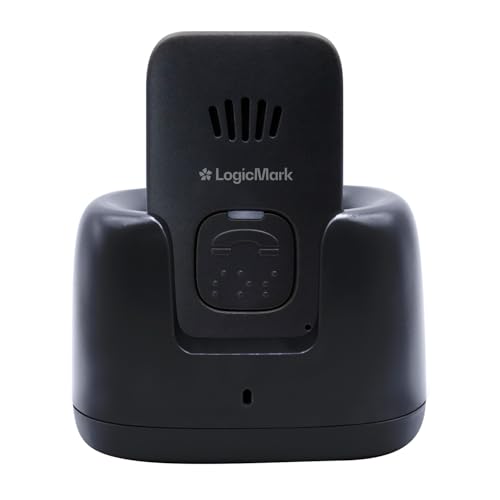
The closest like-for-like swap is the LogicMark Guardian Alert 911 Plus: a two-way voice pendant that reaches 911 over 4G with no landline, with fall detection built in and no monthly fee at all - LogicMark prices it as a one-time purchase. If that is more than the budget allows, the 911 Help Now pendant does the same core job for a fraction of it. If the real obstacle is that nobody will wear a pendant, buy an Apple Watch SE and use its fall detection and Emergency SOS instead. And the budget pick, for a house where somebody else is usually home, is a CallToU caregiver pager.
First, what Life Alert actually is, because the alternatives only make sense against it. Life Alert is a monitored personal emergency response service that has operated since 1987, and its own site describes 24/7 emergency response from its dispatch center along with in-home and on-the-go equipment - a two-way Micro Voice pendant, a wristband button, a wall-mounted help button, and a HELP On-the-Go unit that runs on AT&T cellular coverage. It is also the company behind the line everybody can quote about having fallen and not being able to get up. The monitoring center is the product, and it is a real one.
What sends people looking is the shape of the deal rather than the service. Life Alert publishes no price on its website: ordering runs through a phone call, and the current homepage offer is a free month when you pay a year in advance. Equipment is described as free to use, which means it is leased rather than owned - you give it back. And the agreement has historically run for multiple years rather than month to month, which matters enormously when circumstances at this stage of life can change in a couple of weeks.
So there are four different reasons to look elsewhere, and they point at four different products. Every device below is something you buy once and own, except where we say otherwise. We have not used them; specifications come from the manufacturer or the retailer listing and are attributed as such, and availability was checked before publishing.
This is general information about products, not medical advice. Talk to your doctor or occupational therapist about your own situation.
Some links on this page go to Amazon. If you buy something, we may earn a small commission at no extra cost to you — it never changes which products we pick or the order they appear in. Full disclosure.
Four ways out, and what each one costs you
Be honest about which row you are in before shopping. The single most expensive mistake here is buying a no-fee device for somebody who lives completely alone with nobody reachable - that is the one case where paying a monitoring fee is the correct answer.
Quick picks
Ranked for how little strength, eyesight or patience they need — not for how much they cost.
| # | Product | Best for | Score | Price |
|---|---|---|---|---|
| 1 | LogicMark Guardian Alert 911 PlusA two-way pendant that reaches 911 over 4G LTE with no landline and no subscription, with fall detection included rather than sold as an add-on. | The closest like-for-like swap - two-way voice and fall detection, no fee | 8.8 | $399.00 · View on Amazon #ad Price as of November 28, 2026. How we earn |
| 2 | 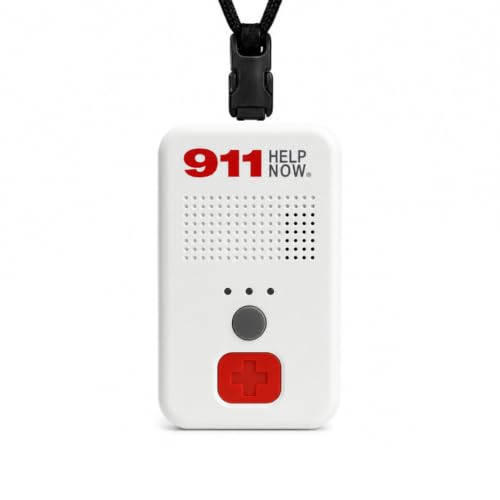 911 Help Now Medical Alert PendantA 4G pendant with a speaker and microphone that dials 911 on a three-second hold, with no subscription, activation fee or contract. | The cheap like-for-like - a cellular pendant that speaks to 911 | 8.0 | $139.95 · View on Amazon #ad Price as of November 28, 2026. How we earn |
| 3 | 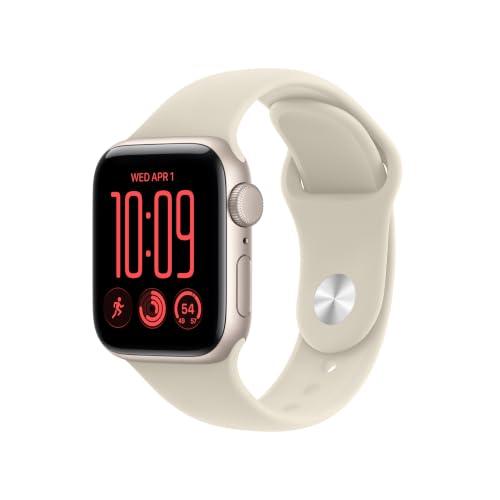 Apple Watch SEFall detection and Emergency SOS inside something that reads as a watch rather than as medical equipment - and no subscription for the watch itself. | Somebody who refuses to wear a pendant | 8.4 | $179.00 · View on Amazon$249.00(28% off) #ad Price as of November 28, 2026. How we earn |
| 4 | 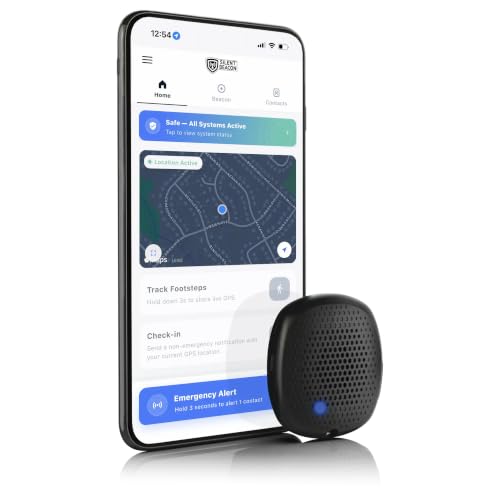 Silent Beacon panic buttonA wearable button that calls any number you choose - including 911 - over a paired phone, with a two-way speakerphone and a battery measured in weeks. | Reaching a chosen person rather than a dispatcher | 7.4 | $59.99 · View on Amazon #ad Price as of November 28, 2026. How we earn |
| 5 | 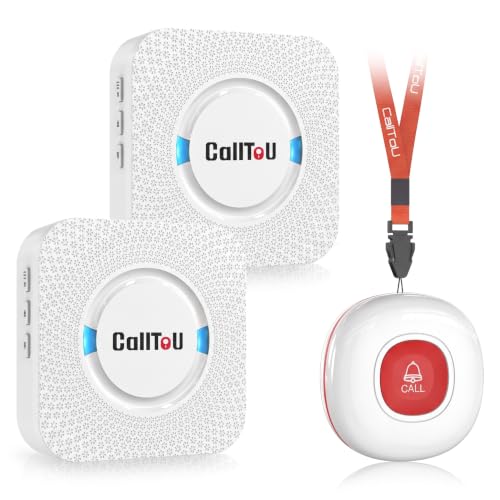 CallToU Wireless Caregiver PagerA waterproof button and two plug-in receivers that reach across a house, for the household whose real need is reaching the person upstairs. | The budget pick - a house where somebody else is usually home | 7.0 | $36.99 · View on Amazon #ad Price as of November 28, 2026. How we earn |
Tap any row to jump to the full write-up. The price button goes to Amazon.
Pick by what’s hard
Most lists sort by price. That is not how this decision actually gets made, so here it is sorted by the thing that is getting in the way.
- The monthly bill is the whole problem
- LogicMark Guardian Alert 911 Plus — buy a cellular pendant you own outright. Two-way voice and fall detection with no subscription is the closest thing to a straight swap, and over five years it costs a fraction of any monitored plan.
- Lives completely alone with nobody nearby
- pay for monitoring, and do not feel bad about it. A trained operator who has the address, the medical notes and the contact list on screen is worth the money in exactly this situation - just buy it month to month rather than on a multi-year agreement.
- They will not wear a pendant
- Apple Watch SE — stop arguing and buy a watch. Monitoring protects nobody if the button is on the dressing table, and half a plan that is actually worn beats a full one that is not.
- Somebody else is in the house most of the day
- CallToU Wireless Caregiver Pager — a caregiver pager is the honest answer and costs less than one month of monitoring. Put one button beside the bed and a second in the bathroom, which is where people actually get stuck.
- You want family called first, not an ambulance
- Silent Beacon panic button — choose a device that dials a number you pick rather than 911. A relative can judge in ten seconds whether this is a fall that needs paramedics or one that needs a hand up; a dispatcher cannot and should not try.
How we picked
We don’t run a product lab. Every pick here is chosen by reading the things that actually tell you whether something works for weak hands, poor eyesight or shaky fingers: the manufacturer’s own specifications, the retailer listing, the measurements and weights, and what owners report in their reviews — especially the one-star ones. We read the complaints before the praise.
Prices change constantly, so we send you to Amazon to see today’s price rather than printing a number that goes stale. More about how we choose.
The picks in full
1. Best for the closest like-for-like swap - two-way voice and fall detection, no fee
LogicMark Guardian Alert 911 Plus
LogicMark · 8.8/10 on our rubric
#ad Price as of November 28, 2026. How we earn
A two-way pendant that reaches 911 over 4G LTE with no landline and no subscription, with fall detection included rather than sold as an add-on.
This is the device that most closely reproduces what a monitored pendant does, minus the monitoring. LogicMark's own product page describes two-way voice communication, a direct connection over 4G LTE with no landline required, built-in proprietary fall detection, an IP67 water resistance rating so it can be worn in the shower, and a weight of about an ounce and a half. The pricing line on that page is the one that matters here: no monthly fees, as a one-time purchase.
Two-way voice is the feature to insist on and the one cheap buttons skip. A pendant that places a call but cannot carry a conversation leaves the person on the floor listening to a dispatcher they cannot answer, which is very nearly as bad as no call at all. Here the speaker and microphone are in the pendant itself, so somebody who cannot reach a phone can still say where they are and what happened.
Fall detection being included rather than an upgrade is the other real difference from a subscription package, where it is usually a monthly add-on. LogicMark calls it proprietary and does not publish a sensitivity figure, so treat it as a useful backstop rather than a guarantee - no fall detection on any device catches every fall, and false alarms are part of the deal on all of them.
The honest limitation is in LogicMark's own description of the product as unmonitored. When the button is pressed, 911 answers. A 911 dispatcher does not have the person's address on file the way a monitoring center does, does not know their conditions or medications, and will not call a daughter first for a minor fall - they send an ambulance, which is the right response to a serious emergency and an expensive one to a stumble. The device also costs real money up front, which is the trade: no bill ever, in exchange for the whole cost on day one.
Good
- Two-way voice in the pendant itself, not just an alert
- 4G LTE with no landline required, per LogicMark
- Fall detection built in at no extra cost
- IP67 water resistance - wearable in the shower
- LogicMark prices it as a one-time purchase with no monthly fees
Watch out for
- Unmonitored by design - 911 answers, not an operator who knows the person
- Battery life is not published on the manufacturer's page
- The whole cost lands on day one
- Works wherever there is 4G coverage, which is not everywhere rural
| Connection | 4G LTE, no landline (manufacturer) |
|---|---|
| Monitoring | None - calls 911 directly |
| Two-way voice | Yes, in the pendant |
| Fall detection | Built in (manufacturer) |
| Water resistance | IP67 |
| Weight | About 1.55 oz (manufacturer) |
How it scores
- Reaches help away from home8.8
- Works if they cannot press it8.2
- Cost over five years9.4
- Will they wear it6.8
2. Best for the cheap like-for-like - a cellular pendant that speaks to 911
911 Help Now Medical Alert Pendant
911 Help Now · 8.0/10 on our rubric
#ad Price as of November 28, 2026. How we earn
A 4G pendant with a speaker and microphone that dials 911 on a three-second hold, with no subscription, activation fee or contract.
The same idea as the LogicMark at a fraction of the price, and the trade-offs are where you would expect them. The listing describes built-in 4G cellular connectivity that works across the United States wherever compatible service is available, a press-and-hold of three seconds to place a call directly to 911, and a built-in microphone and speaker so the person can speak to the dispatcher once the call connects. There is no monitoring center in the loop at all.
The three-second hold is a deliberate design choice rather than an annoyance. A pendant worn on a lanyard inside a cardigan gets pressed by a chair arm, a seatbelt and a hug, and a device that dials emergency services on a brush is a device that gets taken off within a week. A protective cover is included for the same reason, and together they are the difference between a pendant that stays on and one that becomes a drawer item.
Power comes from three AAA batteries rather than a rechargeable cell. That cuts both ways honestly: nothing has to be docked every night, which suits somebody who will not maintain a charging habit, but somebody does have to check and change batteries, and an alert device with dead batteries is worse than no alert device because the household believes it is covered. Put it on a calendar.
What it does not do is the reason to spend more if you can. The listing claims no fall detection, so it is useless to somebody who is unconscious or cannot reach the button. It dials 911 and only 911 - there is no option to ring a daughter first, which means every press is an ambulance-scale response. And the lanyard and clip are the whole wearing system; there is no wristband option.
Good
- No subscription, monitoring fee, activation fee or contract, per the listing
- 4G cellular across the US wherever compatible service exists
- Speaker and microphone, so the person can talk to the dispatcher
- Three-second hold plus a safety cover to prevent accidental calls
- Runs on three AAA batteries - nothing to charge nightly
Watch out for
- No fall detection - useless if they cannot press the button
- Dials 911 only; there is no family-first contact option
- Disposable batteries mean somebody has to check them
- Lanyard and clip only - no wristband version
| Connection | Built-in 4G cellular (listing) |
|---|---|
| Monitoring | None - calls 911 directly |
| Two-way voice | Yes, built-in speaker and mic |
| Fall detection | No |
| Power | 3 AAA batteries (included) |
| Activation | Press and hold 3 seconds |
How it scores
- Reaches help away from home8.0
- Works if they cannot press it2.0
- Cost over five years9.8
- Will they wear it7.2
3. Best for somebody who refuses to wear a pendant
Apple Watch SE
Apple · 8.4/10 on our rubric
#ad Price as of November 28, 2026. How we earn
Fall detection and Emergency SOS inside something that reads as a watch rather than as medical equipment - and no subscription for the watch itself.
The most common reason an alert system fails is not technical. It is that the pendant sits on the dressing table because wearing it announces, every day, that the person wearing it is frail. A watch does not do that, and for a large number of households that single fact is worth more than any feature comparison.
What it buys is genuine. Apple Watch has fall detection that can place a call when a hard fall is detected and there is no response, and Emergency SOS that calls emergency services and notifies the contacts you nominate. Crucially, it can reach family rather than only 911, which is the escalation a monitoring center provides and a 911-only pendant cannot. There is no subscription for any of that - a cellular plan is optional and only matters for use away from a paired iPhone.
The conditions are real. It has to be charged, which is a nightly habit somebody has to keep, and a watch on a charger at 3am is a watch that is not on a wrist. It needs an iPhone in the household for setup. And the person has to be willing to learn a screen, or at least willing to let somebody else set it up and then leave it alone.
This is also the honest middle route for a family that is not sure monitoring is needed yet. Buy the watch, see whether it is worn for two weeks, and you have learned the single most useful thing about this whole category before committing to anything with a monthly bill.
Good
- Gets worn, because it does not look like medical equipment
- Fall detection and Emergency SOS with no subscription for the watch
- Can alert family as well as emergency services
- Doubles as a watch, a step counter and a reminder device
Watch out for
- Needs charging every night - the real failure mode
- Needs an iPhone in the household for setup
- The person has to tolerate a touchscreen, or let somebody set it up for them
- Away from the phone, full function needs a paid cellular plan
| Type | Smartwatch |
|---|---|
| Monitoring | None - calls contacts or emergency services |
| Fall detection | Yes, built in |
| Subscription | None for the watch; cellular plan optional |
| Requires | An iPhone for setup |
How it scores
- Reaches help away from home8.4
- Works if they cannot press it7.8
- Cost over five years8.6
- Will they wear it9.4
4. Best for reaching a chosen person rather than a dispatcher
Silent Beacon panic button
Silent Beacon · 7.4/10 on our rubric
#ad Price as of November 28, 2026. How we earn
A wearable button that calls any number you choose - including 911 - over a paired phone, with a two-way speakerphone and a battery measured in weeks.
This is the alternative for a household whose actual complaint is who answers. Life Alert routes to its own dispatch center; a no-fee pendant routes to 911. The Silent Beacon routes to whichever number you program, which for a lot of families is a daughter who can judge in ten seconds whether this is an ambulance or a lift off the floor.
It works by pairing to a phone over Bluetooth and placing the call through that phone, with a speaker and microphone in the button so the conversation happens there rather than on the handset. The listing claims a 42-day battery between charges, IPX4 water resistance with waterproof microphone, speaker and USB port, and the ability to send a GPS location by text, email and push notification when the button is pressed. There are additional modes including a silent alert and a check-in.
Two things to be clear-eyed about. Because the call goes through a paired phone, the phone has to be within Bluetooth range - Silent Beacon's own support material says the button will still call the emergency number but that secondary features are limited when the phone is out of reach, and it does not publish a range figure. That makes this a device for in and around a house rather than a true go-anywhere pendant.
The second is subscriptions. The basic consumer use is free and Silent Beacon says a second contact number can be added without a subscription when it shares the registered country code, but the Amazon listing also carries a plain note that some features may require a paid subscription. Read the feature you are buying it for carefully before assuming it is included.
Good
- Calls any number you choose, including 911
- Two-way speakerphone in the button itself
- 42-day battery between charges, per the listing
- Sends a GPS location by text, email and push notification on a press
- IPX4 water resistance, with speaker, mic and USB port rated
Watch out for
- Needs a paired phone within Bluetooth range; no range figure published
- The listing notes that some features may require a paid subscription
- No fall detection
- Not a monitored service - nobody is on duty unless your contact answers
| Connection | Bluetooth to a paired phone |
|---|---|
| Calls | Any number, including 911 |
| Two-way voice | Yes, speakerphone in the device |
| Battery | 42 days claimed (listing) |
| Water resistance | IPX4 (listing) |
| Fall detection | No |
How it scores
- Reaches help away from home5.6
- Works if they cannot press it2.0
- Cost over five years9.6
- Will they wear it8.4
5. Best for the budget pick - a house where somebody else is usually home
CallToU Wireless Caregiver Pager
CallToU · 7.0/10 on our rubric
#ad Price as of November 28, 2026. How we earn
A waterproof button and two plug-in receivers that reach across a house, for the household whose real need is reaching the person upstairs.
The cheapest useful answer on this page, and for a particular household it is not a compromise at all. If there is a spouse, an adult child or a live-in carer in the building, the emergency that needs solving is usually not reaching an ambulance - it is reaching the other person in the house, who is two floors away with a vacuum running and did not hear a thing.
The set is one waterproof call button and two receivers that plug into wall outlets, with a stated working range of over 500 feet in the open, 55 ringtones and volume adjustable up to 110 dB. That volume figure is the one that matters: a pager that cannot be heard over a television or through a closed door has solved nothing, and 110 dB gets through both. The button can be worn on a neck strap like a pendant, stuck to a wall, or bracketed beside a bed or a toilet - which is where most of them end up, because those are the two places people get stuck.
Both the button and the receivers are described as waterproof and dustproof, so one can live in a bathroom, which is the single most useful place to put it. Buying a second button for the bathroom and keeping the first by the bed is a sensible twenty dollars.
What it cannot do needs saying plainly: nothing, the moment the house is empty or the person is outside it. It does not call 911, it has no cellular connection, there is no fall detection, and the receivers need mains power so a power cut takes the system out. It is a genuine solution to one specific problem and no help whatsoever with any other.
Good
- The cheapest real solution here, by a wide margin
- Over 500 ft stated range, with two plug-in receivers
- Volume up to 110 dB - audible over a television
- Button and receivers both waterproof, so one can live in the bathroom
- Button wears as a pendant or mounts beside a bed or toilet
Watch out for
- Useless when the house is empty or the person is outside
- No cellular, no 911 and no fall detection
- Receivers need mains power - a power cut disables it
- One button only in the set; a second for the bathroom is worth buying
| Type | In-home caregiver pager |
|---|---|
| In the box | 1 call button, 2 plug-in receivers |
| Range | 500+ ft in the open (listing) |
| Volume | Adjustable to 110 dB, 55 tones |
| Monitoring | None - alerts whoever is in the house |
How it scores
- Reaches help away from home1.0
- Works if they cannot press it2.0
- Cost over five years10.0
- Will they wear it8.0
What Life Alert does that a device cannot
It is worth being fair about this, because the no-fee devices on this page are not strictly better - they are differently shaped. What a monitoring center provides is a trained person who answers in seconds and already knows things: the address, the gate code, where the key safe is, which conditions and medications are relevant, and who to call first. They stay on the line while help arrives, and they escalate proportionately - a family member for a stumble, paramedics for a stroke.
None of that is available from a device that dials 911. A 911 dispatcher is excellent at dispatching emergency services and has no file on the caller, no option to ring a daughter instead, and no way to make a judgment call about severity. Press the button and an ambulance comes, which is exactly right for a serious event and a blunt instrument for a minor one.
The other thing a subscription buys is maintenance. Equipment that fails is replaced while you are a subscriber, batteries get flagged, and the base unit checks in with the center on a schedule so a dead system is noticed by somebody other than the family. A device you own is a device you have to check yourself, and the day it stops working is a day nobody finds out about until it is needed.
If the person lives alone with nobody reachable, monitoring is the right purchase and this page is the wrong one. Read our medical alert roundup instead, which splits the monitored systems by where the person actually spends their time.
Four reasons people leave, and what to do about each
- The monthly cost. Monitored plans generally run in the tens of dollars a month before add-ons, which over five years is a serious sum on a fixed income. The answer is a cellular pendant you own, and the LogicMark is the closest match to what you are giving up.
- The agreement length. Circumstances change fast at this stage of life - somebody moves in with family, goes into residential care, recovers, or dies. The answer is either a device with no agreement at all, or a monitored service sold strictly month to month.
- Never owning the equipment. Life Alert's own site describes free use of equipment, which means it is leased and goes back at the end. If owning the hardware matters to you, every device on this page is bought outright.
- Wanting family to answer. A dispatch center and a 911 call are both strangers. If what the household actually wants is for a named person to be called, pick a device that dials a number you choose.
More than one of these can be true at once, and they do not all point the same way. If the cost and the willingness to wear it are both problems, the watch is usually the answer rather than a cheaper pendant.
If you want monitoring, just not that contract
There is a middle route that this page's product picks do not cover, and for some households it is the right one: keep the monitoring center, lose the long agreement. Medical Guardian is the provider we have looked at most closely, and it sells month-to-month monitoring with published plan pricing rather than a quote by phone. Our Life Alert versus Medical Guardian comparison sets out what the two actually differ on, which is overwhelmingly the contract rather than the quality of the response.
If you shop that route, ask three questions before signing anything and get the answers in writing: what is the total monthly cost with every feature you intend to use, including fall detection; what is the minimum term and the cancellation process; and what happens to the agreement if the subscriber moves into a care facility or passes away. A provider that will not answer those plainly has told you something useful.
Also ask what happens to the equipment. Some providers sell it, some lease it, and the difference shows up as a restocking or non-return fee on the way out - which is exactly the point at which a family is least able to deal with it.
Before you cancel anything
- Read the existing agreement, specifically the term, the notice period and the equipment return clause. Do not rely on what anybody remembers being told on the phone.
- Buy and set up the replacement first, and keep both running for a week. A gap in coverage is the one outcome worth paying a few extra dollars to avoid.
- Test the new device properly: press it, speak to whoever answers, and tell them it is a test. Do that from the bathroom and from the furthest corner of the house, which is where coverage fails.
- Program the contacts in the right order, and tell those people they are on the list. A nominated contact who does not know they are nominated is not a contact.
- Put the batteries or the charging habit on a calendar, monthly. This is the single biggest weakness of every no-fee device on this page.
- Only then cancel, in writing, and keep a copy of the cancellation and the equipment return tracking number.
If the person has memory problems, decide now who is responsible for testing the device each month. A system nobody owns is a system that quietly stops working.
Make the house do some of the work
Whatever you buy, the cheapest fall protection in the house is not an alert at all - it is the bathroom and the hallway. An alert device shortens the time somebody spends on the floor; a grab bar and a shower seat reduce how often they end up there. Our grab bar roundup is honest about which mounting types can actually take body weight, and the shower chair picks cover the seat that goes with it.
The second cheap win is light. A large share of falls happen on a night-time trip to the bathroom, and motion-sensor lights along that route cost a few dollars each. Our motion sensor light roundup covers the plug-in and battery options for exactly that path.
Third, a key safe. Every alternative on this page ends with somebody arriving at a locked door. A lockbox with a code that the family and the responders know turns a broken door into a thirty-second entry, and it costs less than one month of monitoring.
Questions people ask
▸What is the best alternative to Life Alert?
For most households looking to drop the monthly fee, the LogicMark Guardian Alert 911 Plus: a two-way voice pendant that reaches 911 over 4G LTE with no landline, with fall detection included, sold by LogicMark as a one-time purchase with no monthly fees. If the budget is tighter, the 911 Help Now pendant does the same core job without fall detection. If the person will not wear a pendant at all, an Apple Watch SE with fall detection and Emergency SOS is the better buy.
▸Is there a Life Alert alternative with no monthly fee?
Yes, and it is now a real product category rather than a compromise. Cellular pendants from LogicMark and 911 Help Now dial 911 directly over 4G with no subscription, no activation fee and no contract. What you give up is the monitoring center: 911 answers instead of an operator who has the person's address, medical notes and contact list on screen, and who can call a family member first for a minor fall.
▸How much does Life Alert cost per month?
Life Alert does not publish a price on its website. Ordering runs through a phone call, and the current homepage offer is a free month when you pay a year in advance, so the figure you are quoted depends on the package and the payment terms you agree to. Ask for the all-in monthly cost including every feature you intend to use, and ask for the minimum term, before agreeing to anything.
▸Can you cancel Life Alert?
Read your own agreement rather than relying on general advice, because the term, the notice period and the equipment return terms are what govern it, and Life Alert has historically used multi-year agreements rather than month-to-month service. Set up and test the replacement device before you cancel, cancel in writing, and keep the tracking number for the returned equipment - the equipment is leased rather than owned, so it goes back.
▸Do any Life Alert alternatives have fall detection?
Yes. The LogicMark Guardian Alert 911 Plus includes fall detection at no extra cost, which is unusual - on monitored plans it is normally a paid add-on. Apple Watch also has fall detection that can place a call when a hard fall is detected and there is no response. The cheaper buttons on this page, including the 911 Help Now pendant and the Silent Beacon, have no fall detection at all and are useless to somebody who cannot press them.
▸Does Medicare cover a medical alert system?
Generally no. Original Medicare does not cover personal emergency response systems as durable medical equipment, which is why this category is paid for out of pocket. Some Medicare Advantage plans include an allowance that covers one, and some Medicaid waiver programs and area agencies on aging help - ask the specific plan rather than assuming either way.
▸Is a caregiver pager enough instead of a medical alert?
Only if somebody is reliably in the building. A pager is the honest answer for a household with a spouse, an adult child or a live-in carer, where the real problem is reaching the person two floors away rather than reaching an ambulance - and it costs less than one month of monitoring. The moment the house is empty, or the person steps outside it, a pager does nothing at all.
Sources
Read next
Best medical alert
Best medical alert systems for seniors
Alerts ranked by where they work and who answers, including no-monthly-fee options.
Read the guide →
Best with no monthly fee
Best medical alerts with no monthly fee
Subscription-free alerts, with the honest trade-off column nobody else prints.
Read the guide →
Head to head
Life Alert vs Medical Guardian
The contract, the equipment and the exit terms compared — plus the no-fee alternative.
Read the guide →
Best fall detection
Best fall detection devices for elderly adults
Devices with automatic fall detection, and a plain account of the limits.
Read the guide →
Guide
How much does a medical alert system cost?
The real cost of a medical alert system, line by line, and the no-monthly-fee alternatives.
Read the guide →
Best walker under $100
Best walkers under $100
Folding walkers under a hundred dollars - standard, wheeled, bariatric, junior height and one-handed - with the sizing step most people skip.
Read the guide →